How to Buy a List
Never bought crypto before? No problem. This guide walks you through the easiest way to buy USDT or USDC and send it to complete your purchase — it takes about 15–20 minutes the first time.
Yes. All payments are processed by NowPayments — one of the most trusted and widely used crypto payment processors in the world, serving tens of thousands of merchants globally since 2019.
Your payment goes through NowPayments' secure checkout — we never see your wallet address or private keys. You can verify NowPayments independently at nowpayments.io.
How to Buy a List — Step by Step
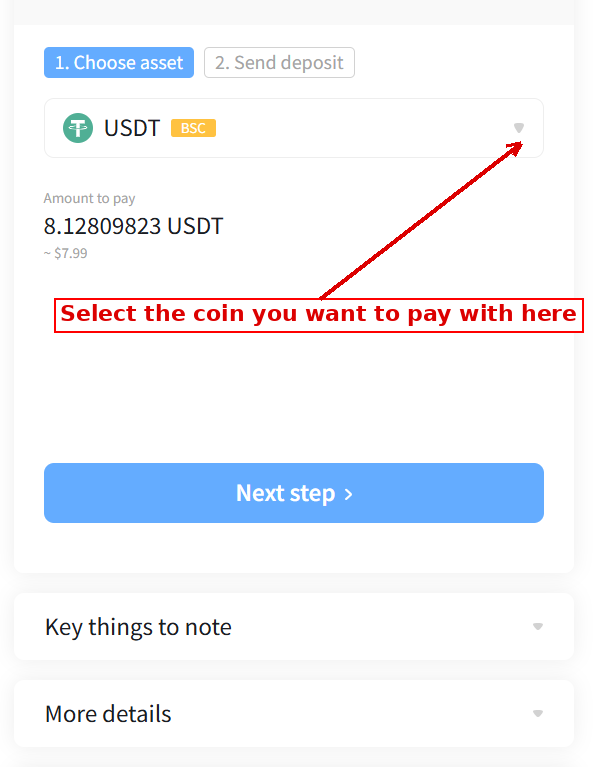
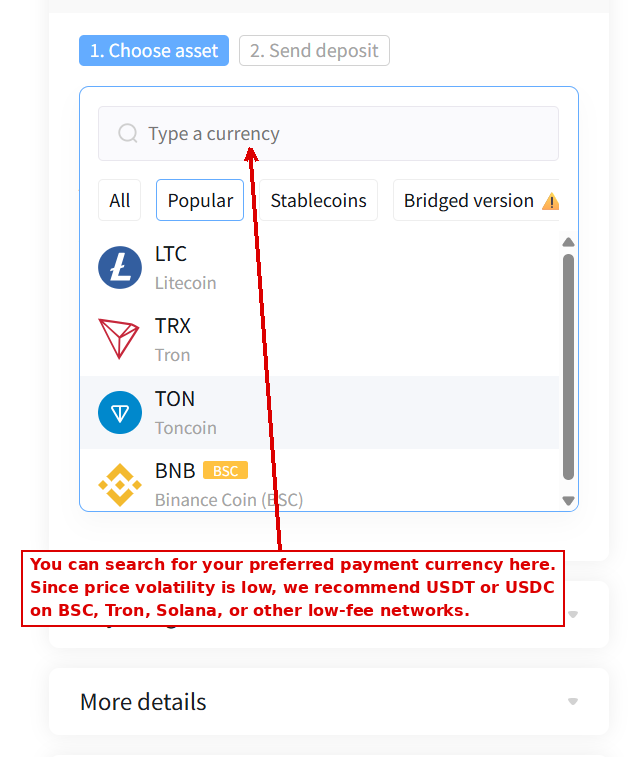
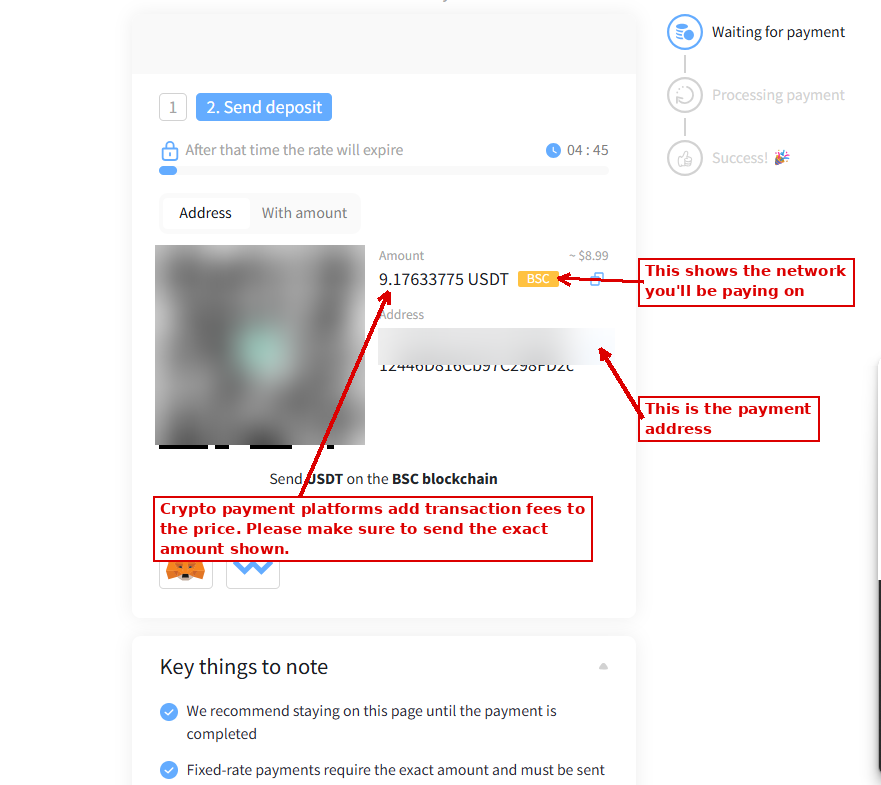
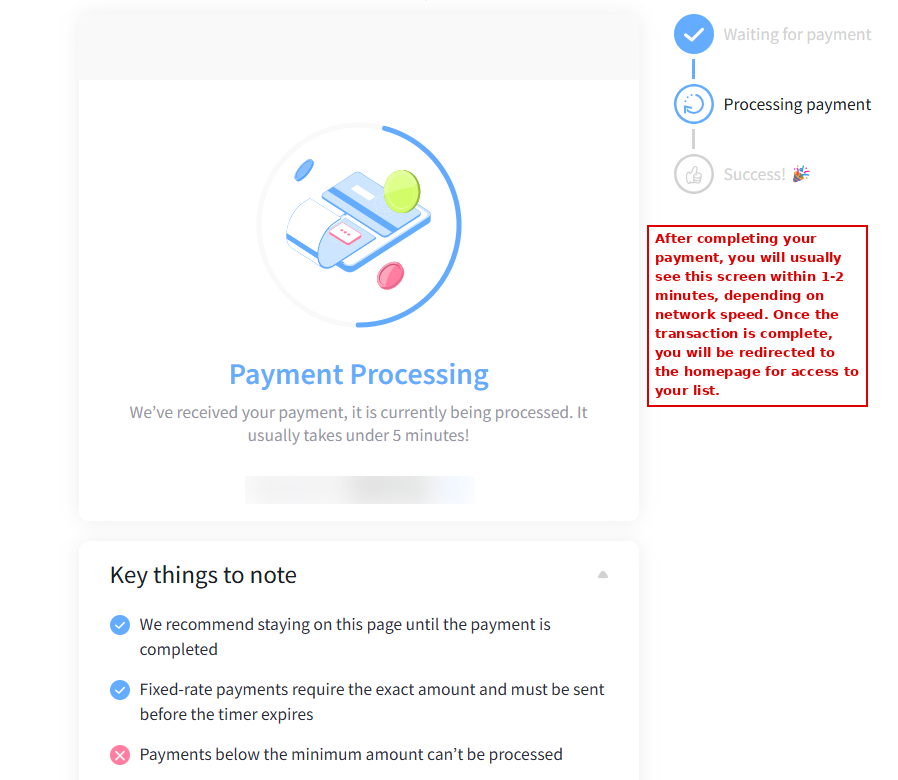
Here's exactly what you'll see on the NowPayments checkout page, step by step.
Already Have Crypto? Quick Tips
If you already hold crypto, you can go straight to checkout. A few pointers before you send:
Why We Accept Crypto Payments
Your privacy comes first. A card payment passes through multiple intermediaries — your bank, the card network, the payment processor — each of which can see and store a record of what you purchased and where. Crypto payments don't carry your name, billing address, or personal identity attached to the transaction, and nothing tied to this purchase will appear on your bank or card statement.
Crypto also means a more stable, uninterrupted service for you. Card networks frequently restrict or shut down payment access for this type of content without warning, which can mean lost access or lost purchase history for customers. Accepting crypto lets us keep the platform running reliably, without that risk hanging over the service.
Step 1: Choose an Exchange
Pick one beginner-friendly, reputable exchange:
| Exchange | Best For | Card Purchases |
|---|---|---|
| Binance | Lower fees, more options | Yes |
| Bybit | Wide coin selection, easy signup | Yes |
| Kraken | Strong security reputation | Yes |
Download the app or go to the website, then tap Sign Up.
Step 2: Verify Your Identity (KYC)
This is a one-time step on any legitimate exchange:
- Enter your email and create a password
- Upload a photo of your government ID (passport or driver's license)
- Take a quick selfie for face verification
- Wait for approval — usually a few minutes, sometimes up to 24 hours
Step 3: Add Funds and Buy Crypto
- Link your debit/credit card or bank account
- Go to Buy Crypto
- Search for USDT (Tether) or USDC (USD Coin) — these are "stablecoins," meaning 1 USDT/USDC ≈ 1 USD, so the value doesn't fluctuate like Bitcoin
- Enter the amount you want to buy (buy a little extra to cover network fees — see Step 5)
- Confirm the purchase
Step 4: Get the Payment Address
On the checkout page where you're paying, you'll see:
- A wallet address (a long string of letters/numbers)
- A QR code
- A specified network (very important — see below)
Step 5: Send the Payment
Crypto can move on different "networks" (rails). Sending on the wrong network can result in permanent loss of funds. The checkout page will tell you which network to use — typically one of:
- In your exchange app, go to Withdraw (not "Send" to another exchange user — you want a withdrawal to an external wallet)
- Paste the wallet address from checkout, or scan the QR code
- Double-check the network dropdown matches exactly
- Enter the amount
- Confirm — you may need 2FA (a code sent to your phone/email)
Step 6: Wait for Confirmation
- TRC-20 (USDT): usually confirms in 1–3 minutes
- Base/Solana (USDC): usually confirms in under a minute
Common Mistakes to Avoid
Frequently Asked Questions
If you're stuck at any step, contact support with:
- A screenshot of the step you're on
- Your transaction hash (if you've already sent payment)